> ## Documentation Index
> Fetch the complete documentation index at: https://docs.discord.com/llms.txt
> Use this file to discover all available pages before exploring further.

# Activities

> Build multiplayer games and social experiences that run directly inside Discord.

export const MagicWandIcon = props => <svg xmlns="http://www.w3.org/2000/svg" width="24" height="24" fill="none"><path fill="currentColor" d="M18.48 13.39a.56.56 0 0 1 1.04 0l.84 2.25 2.25.84c.48.18.48.86 0 1.04l-2.25.84-.84 2.25a.56.56 0 0 1-1.04 0l-.84-2.25-2.25-.84a.56.56 0 0 1 0-1.04l2.25-.84.84-2.25Zm-4.4-5.63c.26-.26.73-.2 1.06.13l1.53 1.53c.33.33.39.8.13 1.06L6.73 20.55c-.26.26-.73.2-1.06-.13L4.14 18.9c-.33-.33-.39-.8-.13-1.05L14.09 7.76Zm3.68-3.88c.26-.25.73-.2 1.05.13l1.54 1.54c.33.33.38.8.13 1.05L18.4 8.68c-.25.25-.72.2-1.05-.13L15.81 7c-.32-.32-.38-.8-.13-1.05l2.08-2.08ZM9.53 1.25a.5.5 0 0 1 .94 0l.62 1.66 1.66.62a.5.5 0 0 1 0 .94l-1.66.62-.62 1.66a.5.5 0 0 1-.94 0L8.91 5.1l-1.66-.62a.5.5 0 0 1 0-.94l1.66-.62.62-1.66Z" /><path fill="currentColor" d="M18.48 13.39a.56.56 0 0 1 1.04 0l.84 2.25 2.25.84c.48.18.48.86 0 1.04l-2.25.84-.84 2.25a.56.56 0 0 1-1.04 0l-.84-2.25-2.25-.84a.56.56 0 0 1 0-1.04l2.25-.84.84-2.25ZM14.09 7.76c.25-.26.72-.2 1.05.13l1.53 1.53c.33.33.39.8.13 1.06L6.73 20.55c-.26.26-.73.2-1.06-.13L4.14 18.9c-.33-.33-.39-.8-.13-1.05L14.09 7.76ZM17.76 3.88c.26-.25.73-.2 1.05.13l1.54 1.54c.33.33.38.8.13 1.05L18.4 8.68c-.25.25-.72.2-1.05-.13L15.8 7c-.32-.32-.38-.8-.13-1.05l2.08-2.08ZM9.53 1.25a.5.5 0 0 1 .94 0l.62 1.66 1.66.62a.5.5 0 0 1 0 .94l-1.66.62-.62 1.66a.5.5 0 0 1-.94 0L8.91 5.1l-1.66-.62a.5.5 0 0 1 0-.94l1.66-.62.62-1.66Z" /></svg>;

export const WrenchIcon = props => <svg xmlns="http://www.w3.org/2000/svg" width="24" height="24" fill="none"><path fill="currentColor" d="M7.8 15.77c.7.43 1.2 1.14 1.2 1.96V21a1 1 0 0 0 1 1h4a1 1 0 0 0 1-1v-3.27c0-.82.5-1.53 1.2-1.96a8.06 8.06 0 0 0 .12-13.63c-.6-.39-1.32.09-1.32.8v5.98a1 1 0 0 1-1 1h-4a1 1 0 0 1-1-1V2.94c0-.71-.72-1.19-1.32-.8a8.06 8.06 0 0 0 .12 13.63Z" /></svg>;

export const ShapesIcon = props => <svg xmlns="http://www.w3.org/2000/svg" width="24" height="24" fill="none"><path fill="currentColor" d="M2.06 7.61c-.25.95.31 1.92 1.26 2.18l4.3 1.15c.94.25 1.91-.31 2.17-1.26l1.15-4.3c.25-.94-.31-1.91-1.26-2.17l-4.3-1.15c-.94-.25-1.91.31-2.17 1.26l-1.15 4.3ZM12.98 7.87a2 2 0 0 0 1.75 2.95H20a2 2 0 0 0 1.76-2.95l-2.63-4.83a2 2 0 0 0-3.51 0l-2.63 4.83ZM5.86 13.27a.89.89 0 0 1 1.28 0l.75.77a.9.9 0 0 0 .54.26l1.06.12c.5.06.85.52.8 1.02l-.13 1.08c-.02.2.03.42.14.6l.56.92c.27.43.14 1-.28 1.26l-.9.58a.92.92 0 0 0-.37.48l-.36 1.02a.9.9 0 0 1-1.15.57l-1-.36a.89.89 0 0 0-.6 0l-1 .36a.9.9 0 0 1-1.15-.57l-.36-1.02a.92.92 0 0 0-.37-.48l-.9-.58a.93.93 0 0 1-.28-1.26l.56-.93c.11-.17.16-.38.14-.59l-.12-1.08c-.06-.5.3-.96.8-1.02l1.05-.12a.9.9 0 0 0 .54-.26l.75-.77ZM18.52 13.71a1.1 1.1 0 0 0-2.04 0l-.46 1.24c-.19.5-.57.88-1.07 1.07l-1.24.46a1.1 1.1 0 0 0 0 2.04l1.24.46c.5.19.88.57 1.07 1.07l.46 1.24c.35.95 1.7.95 2.04 0l.46-1.24c.19-.5.57-.88 1.07-1.07l1.24-.46a1.1 1.1 0 0 0 0-2.04l-1.24-.46a1.8 1.8 0 0 1-1.07-1.07l-.46-1.24Z" /></svg>;

*Already familiar? Jump to the [Activities docs](/developers/activities/overview) or [Building Your First Activity](/developers/activities/building-an-activity).*

## Multiplayer Experiences in Discord

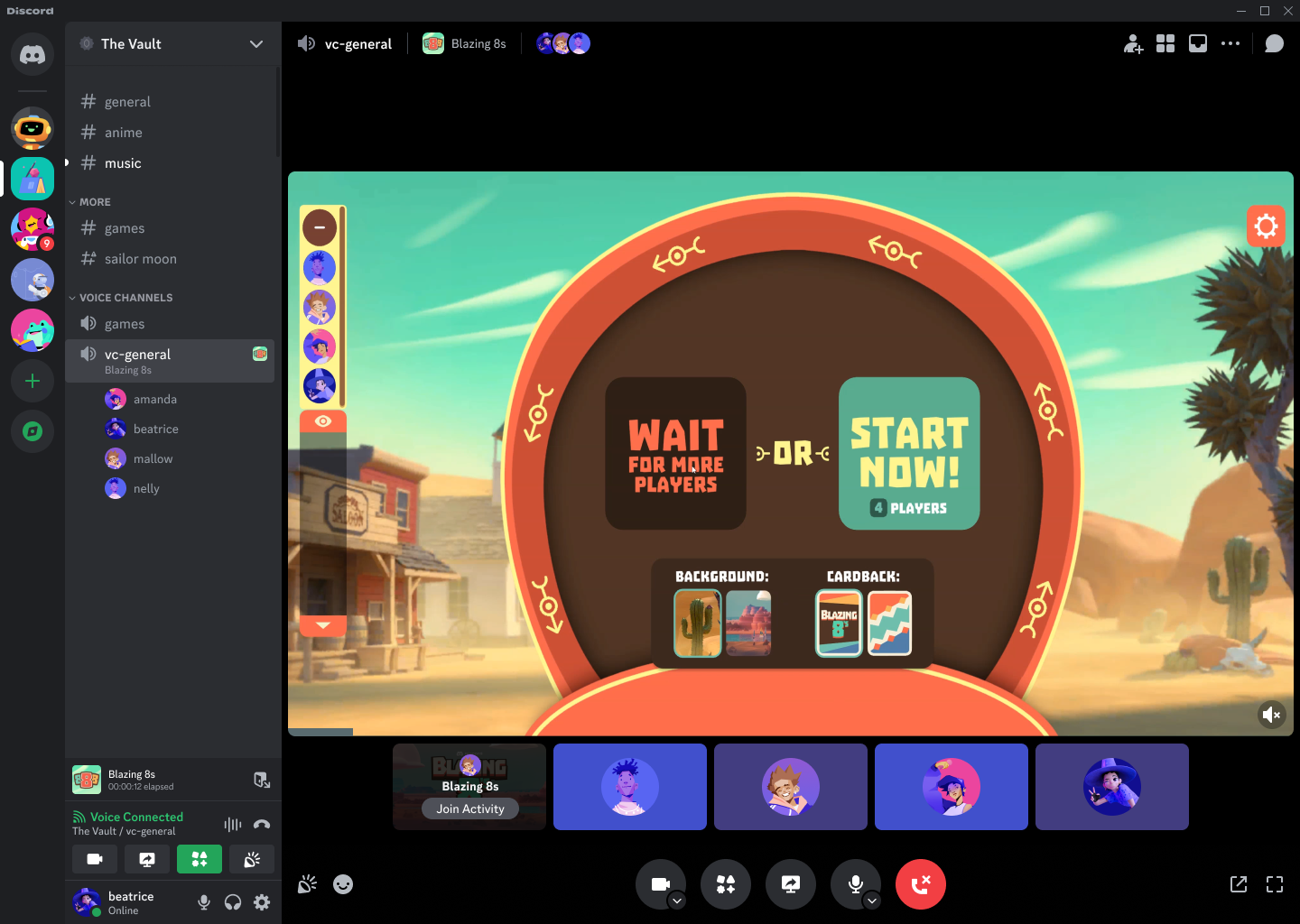
Activities are multiplayer games and social experiences embedded directly in Discord. They can be launched in channels, DMs, or from the App Launcher with no external window or separate download required.

Players can jump in together with friends already in a voice channel, making Activities a natural fit for party games, co-watching, collaborative tools, and more.

<img src="https://mintcdn.com/discord/RRJGQQj4PjDFotjj/images/platform/activity-playing.png?fit=max&auto=format&n=RRJGQQj4PjDFotjj&q=85&s=fef82c3e64d534027802541ce3394df6" alt="Discord Activities" width="1440" height="1024" data-path="images/platform/activity-playing.png" />

## Embedded App SDK for Activities

Under the hood, Activities are an iframe that communicates with Discord using the [Embedded App SDK](/developers/developer-tools/embedded-app-sdk). The SDK provides methods for interacting between your Activity and the Discord client.

## Next Steps

<CardGroup cols={3}>
  <Card title="Activities Overview" href="/developers/activities/overview" icon={<ShapesIcon />}>
    Full guide to how Activities work, launch flows, and the Embedded App SDK.
  </Card>

  <Card title="How Activities Work" href="/developers/activities/how-activities-work" icon={<MagicWandIcon />}>
    Deep dive into the Activity lifecycle, iframe environment, and client communication.
  </Card>

  <Card title="Build Your First Activity" href="/developers/activities/building-an-activity" icon={<WrenchIcon />}>
    Step-by-step guide to setting up and deploying your first Activity.
  </Card>
</CardGroup>
