> ## Documentation Index
> Fetch the complete documentation index at: https://docs.discord.com/llms.txt
> Use this file to discover all available pages before exploring further.
# Account Linking
> Connect a player's Discord account to their in-game account to unlock richer social experiences.
 *Already familiar? Jump to the [implementation guides](#implementing-account-linking) or the [Social SDK docs](/developers/discord-social-sdk/overview).*
## What is Account Linking?
Account linking connects a player's Discord account to their account in your game. Once linked, players gain access to their Discord friends list, game invites, rich presence, and voice directly inside your game.
This link persists across sessions, so players authenticate once and won't need to re-link unless your account linking [scopes](/developers/discord-social-sdk/core-concepts/oauth2-scopes) change. Players who aren't ready to link (or don't have a Discord account yet) can still use social features through [provisional accounts](/developers/discord-social-sdk/development-guides/using-provisional-accounts). When they do link later, their friends, DM history, and lobby memberships transfer automatically to their Discord account.
Account linking is also important for [Social Commerce](/developers/social-commerce/overview) in Discord communities. Players with linked accounts can claim in-game items that they purchase or receive as gifts from Discord Game Shops.
## Why Account Linking Matters
### For Players
Account linking transforms Discord from a second-screen utility into a personalized gaming companion:
* **Seamless social experiences:** Access Discord friends and game invites directly within games.
* **Rich presence integration:** Show detailed game status and activity to friends.
* **Social Commerce:** Claim in-game items purchased or gifted from Discord Game Shops.
### For Developers
Linked players are demonstrably more valuable to your game:
* Players who link in-game accounts to Discord via Social SDK **play more often** - median game launch days increase is 25%\*
* Players who link in-game accounts to Discord via the Social SDK **play longer** - median session length increase is 16%\*
* Players who link in-game accounts to Discord via the Social SDK **retain better** - median D28 retention is 34%\*
These aren't projections. This is causal data from games that have implemented account linking.
\**Discord Internal Data, 2025*
## How Account Linking Works
### Understanding the OAuth2 Flow
Account linking is built on OAuth2, an industry-standard authorization protocol. Here's what happens under the hood when a player links their account:
1. **Your game asks Discord to start the OAuth flow.**
2. **Discord shows the player an OAuth modal asking them to authorize your game and the OAuth scopes being requested.**
3. **The player approves** (authorizes).
4. **Discord gives your game a temporary access token**, which is proof the player agreed to authorize.
5. **Your game uses that token** to access Discord social features on the player's behalf.
You don't need to implement OAuth2 from scratch. The Discord Social SDK handles the authorization flow, token management, and API communication for you. Web Flow uses standard OAuth2, which most web frameworks support out of the box.
The access token your game receives is scoped, meaning it can only access the Discord features you've requested. The Social SDK provides two default scope sets: `GetDefaultPresenceScopes` for presence and friends, and `GetDefaultCommunicationScopes` for messaging, lobbies, and voice.
See the [OAuth2 Scopes for Social SDK page](/developers/discord-social-sdk/core-concepts/oauth2-scopes) for full details.
*Already familiar? Jump to the [implementation guides](#implementing-account-linking) or the [Social SDK docs](/developers/discord-social-sdk/overview).*
## What is Account Linking?
Account linking connects a player's Discord account to their account in your game. Once linked, players gain access to their Discord friends list, game invites, rich presence, and voice directly inside your game.
This link persists across sessions, so players authenticate once and won't need to re-link unless your account linking [scopes](/developers/discord-social-sdk/core-concepts/oauth2-scopes) change. Players who aren't ready to link (or don't have a Discord account yet) can still use social features through [provisional accounts](/developers/discord-social-sdk/development-guides/using-provisional-accounts). When they do link later, their friends, DM history, and lobby memberships transfer automatically to their Discord account.
Account linking is also important for [Social Commerce](/developers/social-commerce/overview) in Discord communities. Players with linked accounts can claim in-game items that they purchase or receive as gifts from Discord Game Shops.
## Why Account Linking Matters
### For Players
Account linking transforms Discord from a second-screen utility into a personalized gaming companion:
* **Seamless social experiences:** Access Discord friends and game invites directly within games.
* **Rich presence integration:** Show detailed game status and activity to friends.
* **Social Commerce:** Claim in-game items purchased or gifted from Discord Game Shops.
### For Developers
Linked players are demonstrably more valuable to your game:
* Players who link in-game accounts to Discord via Social SDK **play more often** - median game launch days increase is 25%\*
* Players who link in-game accounts to Discord via the Social SDK **play longer** - median session length increase is 16%\*
* Players who link in-game accounts to Discord via the Social SDK **retain better** - median D28 retention is 34%\*
These aren't projections. This is causal data from games that have implemented account linking.
\**Discord Internal Data, 2025*
## How Account Linking Works
### Understanding the OAuth2 Flow
Account linking is built on OAuth2, an industry-standard authorization protocol. Here's what happens under the hood when a player links their account:
1. **Your game asks Discord to start the OAuth flow.**
2. **Discord shows the player an OAuth modal asking them to authorize your game and the OAuth scopes being requested.**
3. **The player approves** (authorizes).
4. **Discord gives your game a temporary access token**, which is proof the player agreed to authorize.
5. **Your game uses that token** to access Discord social features on the player's behalf.
You don't need to implement OAuth2 from scratch. The Discord Social SDK handles the authorization flow, token management, and API communication for you. Web Flow uses standard OAuth2, which most web frameworks support out of the box.
The access token your game receives is scoped, meaning it can only access the Discord features you've requested. The Social SDK provides two default scope sets: `GetDefaultPresenceScopes` for presence and friends, and `GetDefaultCommunicationScopes` for messaging, lobbies, and voice.
See the [OAuth2 Scopes for Social SDK page](/developers/discord-social-sdk/core-concepts/oauth2-scopes) for full details.
 ### Two Ways to Link
You can implement account linking through two flows:
| | **Game Flow** | **Web Flow** |
| --------------------- | ---------------------------------------------------------------------------------------- | -------------------------------------------------- |
| **What it is** | Player authorizes from inside your game via the Discord client, overlay, or browser | Player authorizes through a web page on any device |
| **Requires** | Discord Social SDK | Standard OAuth2 implementation |
| **Platforms** | Desktop, Mobile, Console | All platforms that support web |
| **Player experience** | Seamless, stays in-game context (Discord app/overlay launches, or falls back to browser) | Opens a browser / web page |
Both flows produce the same result: the player's Discord account is linked to your game. Neither flow is better than the other, and as long as the same OAuth2 scopes are used, the player gets the same features regardless of which flow they used to link.
We recommend offering both flows to give players the most flexibility. Game Flow only works when the player is actively playing your game on the same device, while Web Flow is a more portable option that supports account linking when the player is engaging with your game through your Official Game Community, Game Shop, or any other web-based touchpoint.
Once a player links through either method, they're linked for both. You can start with one flow and add the other later, and players won't need to re-link.
Web Flow does not mean launching a web browser inside your game. Web Flow is a standalone web-based OAuth2 flow, typically used from Discord entry points or external URLs.
## Implementing Account Linking
### Linking from Your Game
Use the Discord Social SDK to let players link their accounts directly from your game. Choose the guide for your platform:
Guide on implementing account linking from your desktop game using the Social SDK.
Guide on implementing account linking from your mobile game using the Social SDK.
Guide on implementing account linking from your console game using the Social SDK.
### Linking from the Web
Use a standard OAuth2 flow to let players link their accounts through a web page on any device. This doesn't require the Social SDK and works well if you already have web infrastructure. Web Flow is the primary method for enabling [Social Commerce](/developers/social-commerce/overview) features like Game Shops and Game Stat Widgets.
Guide on implementing the standard OAuth2 web flow for account linking.
### Linking from Discord Entry Points
Entry points are buttons and prompts Discord displays throughout the Discord client encouraging players to link their account with your game, even when the game isn't running. Accounts linked from Discord work exactly the same as those linked from your game.
### Two Ways to Link
You can implement account linking through two flows:
| | **Game Flow** | **Web Flow** |
| --------------------- | ---------------------------------------------------------------------------------------- | -------------------------------------------------- |
| **What it is** | Player authorizes from inside your game via the Discord client, overlay, or browser | Player authorizes through a web page on any device |
| **Requires** | Discord Social SDK | Standard OAuth2 implementation |
| **Platforms** | Desktop, Mobile, Console | All platforms that support web |
| **Player experience** | Seamless, stays in-game context (Discord app/overlay launches, or falls back to browser) | Opens a browser / web page |
Both flows produce the same result: the player's Discord account is linked to your game. Neither flow is better than the other, and as long as the same OAuth2 scopes are used, the player gets the same features regardless of which flow they used to link.
We recommend offering both flows to give players the most flexibility. Game Flow only works when the player is actively playing your game on the same device, while Web Flow is a more portable option that supports account linking when the player is engaging with your game through your Official Game Community, Game Shop, or any other web-based touchpoint.
Once a player links through either method, they're linked for both. You can start with one flow and add the other later, and players won't need to re-link.
Web Flow does not mean launching a web browser inside your game. Web Flow is a standalone web-based OAuth2 flow, typically used from Discord entry points or external URLs.
## Implementing Account Linking
### Linking from Your Game
Use the Discord Social SDK to let players link their accounts directly from your game. Choose the guide for your platform:
Guide on implementing account linking from your desktop game using the Social SDK.
Guide on implementing account linking from your mobile game using the Social SDK.
Guide on implementing account linking from your console game using the Social SDK.
### Linking from the Web
Use a standard OAuth2 flow to let players link their accounts through a web page on any device. This doesn't require the Social SDK and works well if you already have web infrastructure. Web Flow is the primary method for enabling [Social Commerce](/developers/social-commerce/overview) features like Game Shops and Game Stat Widgets.
Guide on implementing the standard OAuth2 web flow for account linking.
### Linking from Discord Entry Points
Entry points are buttons and prompts Discord displays throughout the Discord client encouraging players to link their account with your game, even when the game isn't running. Accounts linked from Discord work exactly the same as those linked from your game.
 When a player uses a Discord entry point, Discord determines which flow to use:
1. **Game Flow** is used if the game is running and the developer has called the `RegisterAuthorizeRequestCallback` function in the Social SDK
2. **Web Flow** is used if a **Connection Entrypoint URL** is configured in the Developer Portal
Some of the current Discord entry points include:
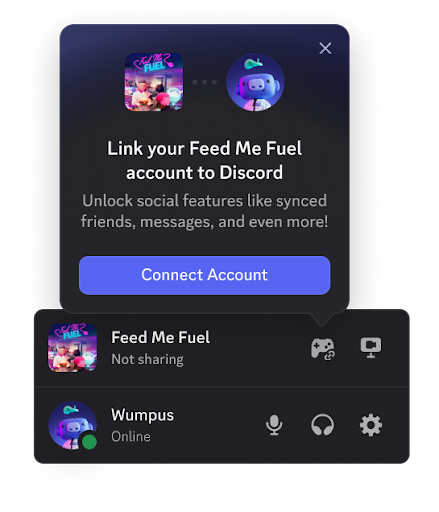
**Game Detection**
Discord detects the player is playing your game and provides an entry point to link if they haven't already.
When a player uses a Discord entry point, Discord determines which flow to use:
1. **Game Flow** is used if the game is running and the developer has called the `RegisterAuthorizeRequestCallback` function in the Social SDK
2. **Web Flow** is used if a **Connection Entrypoint URL** is configured in the Developer Portal
Some of the current Discord entry points include:
**Game Detection**
Discord detects the player is playing your game and provides an entry point to link if they haven't already.
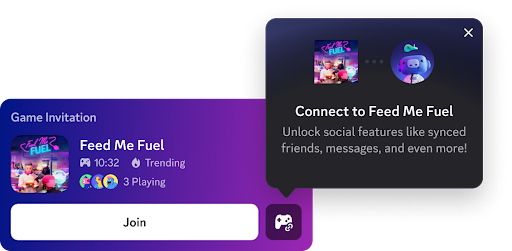
 **Game Invites**
Players are optionally able to link when receiving an invite for your game, which helps them get set up and playing with their friends faster.
**Game Invites**
Players are optionally able to link when receiving an invite for your game, which helps them get set up and playing with their friends faster.
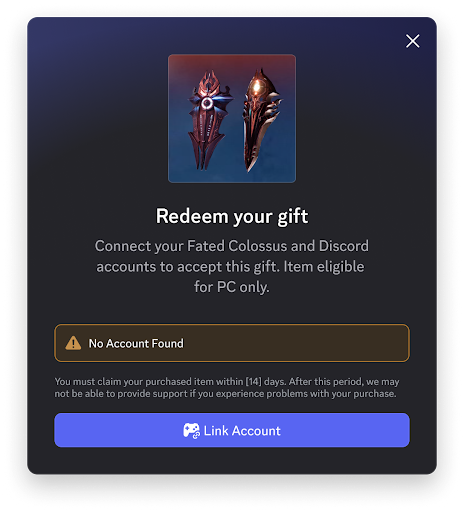
 **Claiming Game Shop Items**
Players need to account link when redeeming items from your Game Shop to be able to receive their in-game rewards.
**Claiming Game Shop Items**
Players need to account link when redeeming items from your Game Shop to be able to receive their in-game rewards.
 Configuring Web Flow to work from official Discord entry points is currently available to select partners. Contact Discord if you're interested in enabling this for your game.
Guide on enabling Discord entry points so players can link from within the Discord client.
## Provisional Accounts
Players who don't have Discord, or who choose not to link yet, can still use social features through provisional accounts. They can add friends, join lobbies, send messages, and participate in voice chat without a Discord account.
When they later link a Discord account, their friends, DM history, and lobby memberships transfer automatically. Learn more in the [Provisional Accounts guide](/developers/discord-social-sdk/development-guides/using-provisional-accounts).
## Next Steps
Discover the Discord-powered social features that account linking unlocks for your game.
Best practices for designing the account linking experience in your game.
Step-by-step guides for integrating the Discord Social SDK with C++, Unity, and Unreal Engine.
Configuring Web Flow to work from official Discord entry points is currently available to select partners. Contact Discord if you're interested in enabling this for your game.
Guide on enabling Discord entry points so players can link from within the Discord client.
## Provisional Accounts
Players who don't have Discord, or who choose not to link yet, can still use social features through provisional accounts. They can add friends, join lobbies, send messages, and participate in voice chat without a Discord account.
When they later link a Discord account, their friends, DM history, and lobby memberships transfer automatically. Learn more in the [Provisional Accounts guide](/developers/discord-social-sdk/development-guides/using-provisional-accounts).
## Next Steps
Discover the Discord-powered social features that account linking unlocks for your game.
Best practices for designing the account linking experience in your game.
Step-by-step guides for integrating the Discord Social SDK with C++, Unity, and Unreal Engine.