> ## Documentation Index
> Fetch the complete documentation index at: https://docs.discord.com/llms.txt
> Use this file to discover all available pages before exploring further.
# Link Previews
> Control how links to your website look when they are shared in Discord.
A link preview or embed is what shows up in Discord when a link to your website is pasted into a chat. If you've ever seen an embed pop up with a description, images, or a video, that is a link preview. Discord builds that card automatically by fetching the page and reading the metadata in its HTML. The process of building that embed is called unfurling.
This page covers the standard unfurling process with a title, description, and image or video. If you want more control over your preview, [Component Embeds](/developers/link-previews/component-embeds) let you build a fully custom layout out of select [Discord components](/developers/components/overview).
Link previews are subject to change.
***
## Quick Start
Drop this into the `` of a page, and you get a preview with your site name, a linked title, a description, an accent color, and a large image below the text.
```html theme={"system"}
```
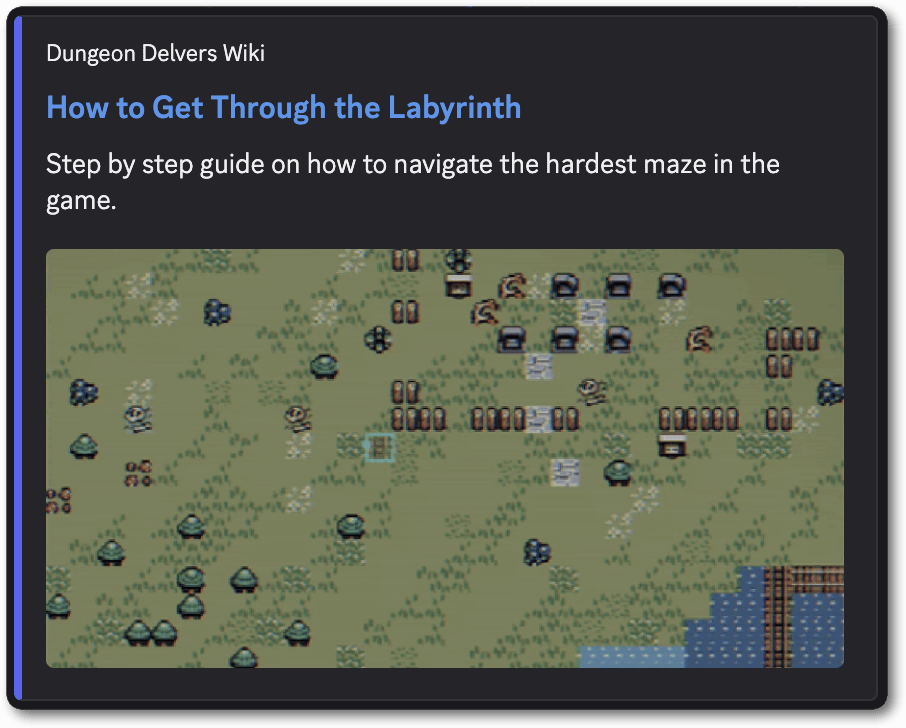 ***
## How Discord Reads Your Page
Discord makes a single `GET` request for the URL that was shared and parses the HTML that comes back. Your page has to meet all of the following for a preview to appear:
* An HTML page served over HTTP or HTTPS.
* The tags must be in the HTML your server sends. No code is executed, so tags added by a client-side script after load are never seen.
* The response must be a 2xx.
* Content type of `text/html` or `application/xhtml+xml`, and not served as a download with `Content-Disposition: attachment`.
* At most 5 redirects.
* At most 50 MB of data returned.
* The whole fetch, including measuring your images and video, must finish within 10 seconds.
***
## Tag Reference
For each tag:
* The key comes from `name` if present, otherwise from `property`.
* The value comes from `content` if present, otherwise from `value`.
* Key names are case-sensitive.
* When several tags map to the same field, the first non-empty one wins for the title, description, and site name. For layout, color, and date tags, the last one in the document wins.
| Tag | Embed field | Notes |
| - | - | - |
| `og:title`, `twitter:title` | title | |
| `og:description`, `twitter:description` | description | Plain text, unless `og:type` is `rich` then the text is rendered using Discord markdown. |
| `` plus `<meta name="description">` | title and description | Used only as a pair, and only when the page doesn't have a title or description for Open Graph or Twitter. |
| `og:site_name` | provider name | Shown above the title. |
| `og:image`, `og:image:url`, `og:image:secure_url`, `twitter:image`, `twitter:image:src` | image or thumbnail | See [Images](/developers/link-previews/overview#images). |
| `og:image:width`, `og:image:height`, `twitter:image:width`, `twitter:image:height` | image dimensions | Apply to the most recent `og:image` or `twitter:image` tag above them. |
| `og:image:type` | image media type | Must be a supported format. See [Images](/developers/link-previews/overview#images). |
| `og:image:alt`, `twitter:image:alt` | image alt text | |
| `og:video`, `og:video:url`, `og:video:secure_url`, `twitter:player:stream` | video | See [Video](/developers/link-previews/overview#video). |
| `og:video:width`, `og:video:height`, `twitter:player:width`, `twitter:player:height`, `og:width`, `og:height` | video dimensions | Optional. Discord measures the video file itself. |
| `og:video:type`, `twitter:player:stream:content_type` | video media type | Only `video/mp4`, `video/webm`, and `video/quicktime`. |
| `og:type` | layout | Only `rich`, `video`, `video.*`, and `instapp:photo`. |
| `twitter:card` | layout | `player`, `summary_large_image`, and `photo` change the layout. |
| `theme-color` | accent color | `#RRGGBB` or `#RRGGBBAA` only. |
| `og:pubdate`, `pubdate`, `iso-8601-publish-date` | timestamp | Full RFC 3339, including time and offset. |
| JSON-LD `VideoObject` | title, description, video, thumbnail, timestamp | A top-level `schema.org` `VideoObject`. Discord reads `name`, `description`, `embedUrl`, `thumbnailUrl`, and `uploadDate`. |
| `<link type="application/json+oembed">` | oEmbed discovery | The first matching link is used. See [oEmbed](/developers/link-previews/overview#oembed). |
***
## Preview Layouts
The tags you set decide which embed layout is chosen.
<Frame caption="When setting title, description, and one image, with no layout tags you'll see text with a small image.">
<img src="https://mintcdn.com/discord/W_nQKhFzAvtYBSku/images/link-previews/link-preview-example-default.webp?fit=max&auto=format&n=W_nQKhFzAvtYBSku&q=85&s=a6379234e93c58b912d7ea41783c97f7" alt="Title, description, and one image, with no layout tags example" style={{width: "100%", height: "auto"}} width="1084" height="274" data-path="images/link-previews/link-preview-example-default.webp" />
</Frame>
<Frame caption="When `twitter:card` is set to `summary_large_image` you'll see text with a large image below it.">
<img src="https://mintcdn.com/discord/W_nQKhFzAvtYBSku/images/link-previews/link-preview-example-text-large-image.webp?fit=max&auto=format&n=W_nQKhFzAvtYBSku&q=85&s=9c2da1ac08936cf3b5a9822b341e61c0" alt="`twitter:card` set to `summary_large_image` example" style={{width: "100%", height: "auto"}} width="908" height="728" data-path="images/link-previews/link-preview-example-text-large-image.webp" />
</Frame>
<Frame caption="When `twitter:card` is set to `photo`, or the shared URL points straight at an image file, you'll see the image on its own, with no description. ">
<img src="https://mintcdn.com/discord/W_nQKhFzAvtYBSku/images/link-previews/link-preview-example-only-image.webp?fit=max&auto=format&n=W_nQKhFzAvtYBSku&q=85&s=b4a8d2b465bb3717112859586e159e13" alt="`twitter:card` set to `photo`, or the shared URL points straight at an image file example" style={{width: "100%", height: "auto"}} width="904" height="640" data-path="images/link-previews/link-preview-example-only-image.webp" />
</Frame>
<Frame caption="When `og:type` is set to `video.other` or `twitter:card` is set to `player`, plus a video file, you'll see an inline video player using `og:image` as the preview frame, with no description.">
<img src="https://mintcdn.com/discord/W_nQKhFzAvtYBSku/images/link-previews/link-preview-example-video.webp?fit=max&auto=format&n=W_nQKhFzAvtYBSku&q=85&s=4e76aee0c2a9ce8e2adde2b4cdc0a6ea" alt="`og:type` set to `video.other` or `twitter:card` set to `player`, plus a video file example" style={{width: "100%", height: "auto"}} width="906" height="672" data-path="images/link-previews/link-preview-example-video.webp" />
</Frame>
<Frame caption="When there are two or more `og:image` tags you'll see a gallery of up to 4 images.">
<img src="https://mintcdn.com/discord/W_nQKhFzAvtYBSku/images/link-previews/link-preview-example-gallery.webp?fit=max&auto=format&n=W_nQKhFzAvtYBSku&q=85&s=9a693527af80a6bd48e7748987e51c75" alt="Two or more `og:image` tags example" style={{width: "100%", height: "auto"}} width="906" height="874" data-path="images/link-previews/link-preview-example-gallery.webp" />
</Frame>
<Frame caption="When `og:type` is set to `rich` you'll see Discord rendered markdown text with a small thumbnail.">
<img src="https://mintcdn.com/discord/W_nQKhFzAvtYBSku/images/link-previews/link-preview-example-rich.webp?fit=max&auto=format&n=W_nQKhFzAvtYBSku&q=85&s=35ca15e5a66ec06c8b0a355084fb0ada" alt="`og:type` set to `rich` example" style={{width: "100%", height: "auto"}} width="1082" height="280" data-path="images/link-previews/link-preview-example-rich.webp" />
</Frame>
***
## Images
* Supported formats are `.png`, `.gif`, `.jpg`, `.jpeg`, `.webp`, and `.avif`.
* Provide `og:image:width` and `og:image:height`. Without them, Discord fetches the image to measure it.
* Relative URLs must start with `/`.
* Dimension, type, and alt tags attach to `og:image` and `twitter:image` only. They are not read for `og:image:url`, `og:image:secure_url`, or `twitter:image:src`, so use the plain tag names when you want to declare dimensions.
* Two or more `og:image` tags produce a gallery. At most 4 images are shown.
* Sharing a URL that points straight at an image file produces an image preview with no metadata required.
<Info>
To display up to 10 images, use [Component Embeds](/developers/link-previews/component-embeds).
</Info>
***
## Video
* Supported formats are `.mp4`, `.webm`, and `.mov`.
* Point the `og:video` tag directly at the video file.
* Set `og:type` to `video` or `video.*`. Or set `twitter:card` to `player`.
* `og:image` is required to render the video and it becomes the preview frame.
* Serve the file over `https`.
* Discord measures the file to size the player, so `og:video:width` and `og:video:height` are optional. If the file cannot be measured and no dimensions are declared, the video is dropped and the layout falls back to a plain link preview.
```html theme={"system"}
<meta property="og:type" content="video.other">
<meta property="og:video" content="https://watchanimeattheoffice.com/videos/dungeon-delvers-content-update.mp4">
<meta property="og:video:type" content="video/mp4">
<meta property="og:video:width" content="1280">
<meta property="og:video:height" content="720">
<meta property="og:image" content="https://watchanimeattheoffice.com/videos/dungeon-delvers-content-update-still.png">
<meta property="og:image:width" content="1280">
<meta property="og:image:height" content="720">
```
***
## oEmbed
Discord supports oEmbed in JSON only, discovered through a link tag in your document:
```html theme={"system"}
<link type="application/json+oembed" href="https://watchanimeattheoffice.com/oembed?url=https://watchanimeattheoffice.com/labyrinth">
```
oEmbed runs after Open Graph, so most of its fields fill gaps rather than replacing what your `<meta>` tags already said. These fields are used:
| Field | Effect |
| - | - |
| `title` | Sets the title, only if no Open Graph or Twitter title was found. |
| `thumbnail_url` | Sets the image, only if no Open Graph image was found. |
| `thumbnail_width`, `thumbnail_height` | Required alongside `thumbnail_url`. Without both, the thumbnail is not used. |
| `author_name`, `author_url` | Set the author line. oEmbed is the only way to put an author on a preview. |
| `provider_name`, `provider_url` | Override `og:site_name` and give the site name a link. |
| `type` | Sets the layout, only if no type was set by `og:type` or `twitter:card`. |
`html`, `url`, `width`, `height`, and `cache_age` are ignored. Errors fetching or parsing the oEmbed document are ignored too.
```json theme={"system"}
{
"version": "1.0",
"type": "link",
"title": "Update to Dungeon Generation",
"author_name": "Anthony Tešija",
"author_url": "https://watchanimeattheoffice.com/developer/ant",
"provider_name": "Dungeon Delvers",
"provider_url": "https://watchanimeattheoffice.com",
"thumbnail_url": "https://watchanimeattheoffice.com/images/dungeon.png",
"thumbnail_width": 1200,
"thumbnail_height": 630
}
```
***
## Accent Color and Publish Date
`theme-color` sets the accent color of the preview, and it has to be a 6 or 8 digit hex value:
```html theme={"system"}
<meta name="theme-color" content="#5865F2">
```
Publish dates have to be full RFC 3339 timestamps with a time and an offset:
```html theme={"system"}
<meta property="og:pubdate" content="2026-09-15T12:00:00Z">
```
***
## Limits
| Field | Limit | Over the limit |
| - | - | - |
| Title | 70 bytes, 3 lines | Trimmed |
| Description | 350 bytes, 20 lines | Trimmed |
| `og:site_name` | 256 characters | No preview at all |
| Image alt text | 4,096 characters | No preview at all |
| Any URL | 2,048 characters | No preview at all |
| Images per link | 4 | Extra images are not shown |
| Links per message | 5 | Later links get no preview |
The description is shown as plain text, and HTML tags in it appear literally. On `og:type` `rich` previews, the description is rendered as Discord markdown instead.
***
## Caching and Testing
Discord caches previews for about 30 minutes. While a preview is cached, editing your tags and resharing the same URL shows the old card. To see changes immediately, share the URL with a new query string, such as `?v=2`.
You can also use the [Embed Debugger](https://discord.com/developers/embeds) which shows how Discord reads a URL, including which tags it picked up and which layout it chose.
***
## Next Steps
<Card title="Component Embeds" href="/developers/link-previews/component-embeds">
Build a fully custom preview layout for your links out of Discord components.
</Card>
***
## How Discord Reads Your Page
Discord makes a single `GET` request for the URL that was shared and parses the HTML that comes back. Your page has to meet all of the following for a preview to appear:
* An HTML page served over HTTP or HTTPS.
* The tags must be in the HTML your server sends. No code is executed, so tags added by a client-side script after load are never seen.
* The response must be a 2xx.
* Content type of `text/html` or `application/xhtml+xml`, and not served as a download with `Content-Disposition: attachment`.
* At most 5 redirects.
* At most 50 MB of data returned.
* The whole fetch, including measuring your images and video, must finish within 10 seconds.
***
## Tag Reference
For each tag:
* The key comes from `name` if present, otherwise from `property`.
* The value comes from `content` if present, otherwise from `value`.
* Key names are case-sensitive.
* When several tags map to the same field, the first non-empty one wins for the title, description, and site name. For layout, color, and date tags, the last one in the document wins.
| Tag | Embed field | Notes |
| - | - | - |
| `og:title`, `twitter:title` | title | |
| `og:description`, `twitter:description` | description | Plain text, unless `og:type` is `rich` then the text is rendered using Discord markdown. |
| `` plus `<meta name="description">` | title and description | Used only as a pair, and only when the page doesn't have a title or description for Open Graph or Twitter. |
| `og:site_name` | provider name | Shown above the title. |
| `og:image`, `og:image:url`, `og:image:secure_url`, `twitter:image`, `twitter:image:src` | image or thumbnail | See [Images](/developers/link-previews/overview#images). |
| `og:image:width`, `og:image:height`, `twitter:image:width`, `twitter:image:height` | image dimensions | Apply to the most recent `og:image` or `twitter:image` tag above them. |
| `og:image:type` | image media type | Must be a supported format. See [Images](/developers/link-previews/overview#images). |
| `og:image:alt`, `twitter:image:alt` | image alt text | |
| `og:video`, `og:video:url`, `og:video:secure_url`, `twitter:player:stream` | video | See [Video](/developers/link-previews/overview#video). |
| `og:video:width`, `og:video:height`, `twitter:player:width`, `twitter:player:height`, `og:width`, `og:height` | video dimensions | Optional. Discord measures the video file itself. |
| `og:video:type`, `twitter:player:stream:content_type` | video media type | Only `video/mp4`, `video/webm`, and `video/quicktime`. |
| `og:type` | layout | Only `rich`, `video`, `video.*`, and `instapp:photo`. |
| `twitter:card` | layout | `player`, `summary_large_image`, and `photo` change the layout. |
| `theme-color` | accent color | `#RRGGBB` or `#RRGGBBAA` only. |
| `og:pubdate`, `pubdate`, `iso-8601-publish-date` | timestamp | Full RFC 3339, including time and offset. |
| JSON-LD `VideoObject` | title, description, video, thumbnail, timestamp | A top-level `schema.org` `VideoObject`. Discord reads `name`, `description`, `embedUrl`, `thumbnailUrl`, and `uploadDate`. |
| `<link type="application/json+oembed">` | oEmbed discovery | The first matching link is used. See [oEmbed](/developers/link-previews/overview#oembed). |
***
## Preview Layouts
The tags you set decide which embed layout is chosen.
<Frame caption="When setting title, description, and one image, with no layout tags you'll see text with a small image.">
<img src="https://mintcdn.com/discord/W_nQKhFzAvtYBSku/images/link-previews/link-preview-example-default.webp?fit=max&auto=format&n=W_nQKhFzAvtYBSku&q=85&s=a6379234e93c58b912d7ea41783c97f7" alt="Title, description, and one image, with no layout tags example" style={{width: "100%", height: "auto"}} width="1084" height="274" data-path="images/link-previews/link-preview-example-default.webp" />
</Frame>
<Frame caption="When `twitter:card` is set to `summary_large_image` you'll see text with a large image below it.">
<img src="https://mintcdn.com/discord/W_nQKhFzAvtYBSku/images/link-previews/link-preview-example-text-large-image.webp?fit=max&auto=format&n=W_nQKhFzAvtYBSku&q=85&s=9c2da1ac08936cf3b5a9822b341e61c0" alt="`twitter:card` set to `summary_large_image` example" style={{width: "100%", height: "auto"}} width="908" height="728" data-path="images/link-previews/link-preview-example-text-large-image.webp" />
</Frame>
<Frame caption="When `twitter:card` is set to `photo`, or the shared URL points straight at an image file, you'll see the image on its own, with no description. ">
<img src="https://mintcdn.com/discord/W_nQKhFzAvtYBSku/images/link-previews/link-preview-example-only-image.webp?fit=max&auto=format&n=W_nQKhFzAvtYBSku&q=85&s=b4a8d2b465bb3717112859586e159e13" alt="`twitter:card` set to `photo`, or the shared URL points straight at an image file example" style={{width: "100%", height: "auto"}} width="904" height="640" data-path="images/link-previews/link-preview-example-only-image.webp" />
</Frame>
<Frame caption="When `og:type` is set to `video.other` or `twitter:card` is set to `player`, plus a video file, you'll see an inline video player using `og:image` as the preview frame, with no description.">
<img src="https://mintcdn.com/discord/W_nQKhFzAvtYBSku/images/link-previews/link-preview-example-video.webp?fit=max&auto=format&n=W_nQKhFzAvtYBSku&q=85&s=4e76aee0c2a9ce8e2adde2b4cdc0a6ea" alt="`og:type` set to `video.other` or `twitter:card` set to `player`, plus a video file example" style={{width: "100%", height: "auto"}} width="906" height="672" data-path="images/link-previews/link-preview-example-video.webp" />
</Frame>
<Frame caption="When there are two or more `og:image` tags you'll see a gallery of up to 4 images.">
<img src="https://mintcdn.com/discord/W_nQKhFzAvtYBSku/images/link-previews/link-preview-example-gallery.webp?fit=max&auto=format&n=W_nQKhFzAvtYBSku&q=85&s=9a693527af80a6bd48e7748987e51c75" alt="Two or more `og:image` tags example" style={{width: "100%", height: "auto"}} width="906" height="874" data-path="images/link-previews/link-preview-example-gallery.webp" />
</Frame>
<Frame caption="When `og:type` is set to `rich` you'll see Discord rendered markdown text with a small thumbnail.">
<img src="https://mintcdn.com/discord/W_nQKhFzAvtYBSku/images/link-previews/link-preview-example-rich.webp?fit=max&auto=format&n=W_nQKhFzAvtYBSku&q=85&s=35ca15e5a66ec06c8b0a355084fb0ada" alt="`og:type` set to `rich` example" style={{width: "100%", height: "auto"}} width="1082" height="280" data-path="images/link-previews/link-preview-example-rich.webp" />
</Frame>
***
## Images
* Supported formats are `.png`, `.gif`, `.jpg`, `.jpeg`, `.webp`, and `.avif`.
* Provide `og:image:width` and `og:image:height`. Without them, Discord fetches the image to measure it.
* Relative URLs must start with `/`.
* Dimension, type, and alt tags attach to `og:image` and `twitter:image` only. They are not read for `og:image:url`, `og:image:secure_url`, or `twitter:image:src`, so use the plain tag names when you want to declare dimensions.
* Two or more `og:image` tags produce a gallery. At most 4 images are shown.
* Sharing a URL that points straight at an image file produces an image preview with no metadata required.
<Info>
To display up to 10 images, use [Component Embeds](/developers/link-previews/component-embeds).
</Info>
***
## Video
* Supported formats are `.mp4`, `.webm`, and `.mov`.
* Point the `og:video` tag directly at the video file.
* Set `og:type` to `video` or `video.*`. Or set `twitter:card` to `player`.
* `og:image` is required to render the video and it becomes the preview frame.
* Serve the file over `https`.
* Discord measures the file to size the player, so `og:video:width` and `og:video:height` are optional. If the file cannot be measured and no dimensions are declared, the video is dropped and the layout falls back to a plain link preview.
```html theme={"system"}
<meta property="og:type" content="video.other">
<meta property="og:video" content="https://watchanimeattheoffice.com/videos/dungeon-delvers-content-update.mp4">
<meta property="og:video:type" content="video/mp4">
<meta property="og:video:width" content="1280">
<meta property="og:video:height" content="720">
<meta property="og:image" content="https://watchanimeattheoffice.com/videos/dungeon-delvers-content-update-still.png">
<meta property="og:image:width" content="1280">
<meta property="og:image:height" content="720">
```
***
## oEmbed
Discord supports oEmbed in JSON only, discovered through a link tag in your document:
```html theme={"system"}
<link type="application/json+oembed" href="https://watchanimeattheoffice.com/oembed?url=https://watchanimeattheoffice.com/labyrinth">
```
oEmbed runs after Open Graph, so most of its fields fill gaps rather than replacing what your `<meta>` tags already said. These fields are used:
| Field | Effect |
| - | - |
| `title` | Sets the title, only if no Open Graph or Twitter title was found. |
| `thumbnail_url` | Sets the image, only if no Open Graph image was found. |
| `thumbnail_width`, `thumbnail_height` | Required alongside `thumbnail_url`. Without both, the thumbnail is not used. |
| `author_name`, `author_url` | Set the author line. oEmbed is the only way to put an author on a preview. |
| `provider_name`, `provider_url` | Override `og:site_name` and give the site name a link. |
| `type` | Sets the layout, only if no type was set by `og:type` or `twitter:card`. |
`html`, `url`, `width`, `height`, and `cache_age` are ignored. Errors fetching or parsing the oEmbed document are ignored too.
```json theme={"system"}
{
"version": "1.0",
"type": "link",
"title": "Update to Dungeon Generation",
"author_name": "Anthony Tešija",
"author_url": "https://watchanimeattheoffice.com/developer/ant",
"provider_name": "Dungeon Delvers",
"provider_url": "https://watchanimeattheoffice.com",
"thumbnail_url": "https://watchanimeattheoffice.com/images/dungeon.png",
"thumbnail_width": 1200,
"thumbnail_height": 630
}
```
***
## Accent Color and Publish Date
`theme-color` sets the accent color of the preview, and it has to be a 6 or 8 digit hex value:
```html theme={"system"}
<meta name="theme-color" content="#5865F2">
```
Publish dates have to be full RFC 3339 timestamps with a time and an offset:
```html theme={"system"}
<meta property="og:pubdate" content="2026-09-15T12:00:00Z">
```
***
## Limits
| Field | Limit | Over the limit |
| - | - | - |
| Title | 70 bytes, 3 lines | Trimmed |
| Description | 350 bytes, 20 lines | Trimmed |
| `og:site_name` | 256 characters | No preview at all |
| Image alt text | 4,096 characters | No preview at all |
| Any URL | 2,048 characters | No preview at all |
| Images per link | 4 | Extra images are not shown |
| Links per message | 5 | Later links get no preview |
The description is shown as plain text, and HTML tags in it appear literally. On `og:type` `rich` previews, the description is rendered as Discord markdown instead.
***
## Caching and Testing
Discord caches previews for about 30 minutes. While a preview is cached, editing your tags and resharing the same URL shows the old card. To see changes immediately, share the URL with a new query string, such as `?v=2`.
You can also use the [Embed Debugger](https://discord.com/developers/embeds) which shows how Discord reads a URL, including which tags it picked up and which layout it chose.
***
## Next Steps
<Card title="Component Embeds" href="/developers/link-previews/component-embeds">
Build a fully custom preview layout for your links out of Discord components.
</Card>