> ## Documentation Index
> Fetch the complete documentation index at: https://docs.discord.com/llms.txt
> Use this file to discover all available pages before exploring further.
# Component Embeds
> Build a custom link preview for your website using Discord components.
A link preview or embed is what shows up in Discord when a link to your website is pasted into a chat. A component embed replaces that preview with a layout you control, built from a subset of the same [components](/developers/components/reference) apps use in messages.
Link previews are subject to change.
***
## Prerequisites
* Content type of `text/html` or `application/xhtml+xml`, and not served as a download with `Content-Disposition: attachment`.
* The tag is present in the server-rendered markup. Discord does not execute code, so a tag injected by a client-side script is never seen.
* Discord's crawler can reach the page. Pages are fetched with the user agent `Mozilla/5.0 (compatible; Discordbot/2.0; +https://discordapp.com)`, and linked JSON with `Discordbot/2.0`.
* The whole fetch, including every image in the payload, must finish within 10 seconds.
* Open Graph tags are present, so a standard preview is available when a component embed can't be shown. See [Link Previews](/developers/link-previews/overview) for the tags Discord reads.
***
## Adding the Payload
There are two ways to expose the JSON. You can include the JSON directly in the page with a `
```
### Option 2: Linked JSON
Serve the JSON from a URL on the same site and point at it with a `` element. The `href` must be an absolute URL on the page's host, a subdomain of it, or its parent domain. For example, a page on `example.com` can link to JSON on `cdn.example.com`, or the other way around. The JSON can be served with any `Content-Type`, or none.
```html theme={"system"}
```
***
## Payload Structure
The document, inline or linked, must be a JSON object with a single, parent [Container](/developers/components/reference#container-container-structure) component. No other component can exist at the top level with the container.
```json theme={"system"}
{
"component": {
"type": 17,
"components": [
{
"type": 10,
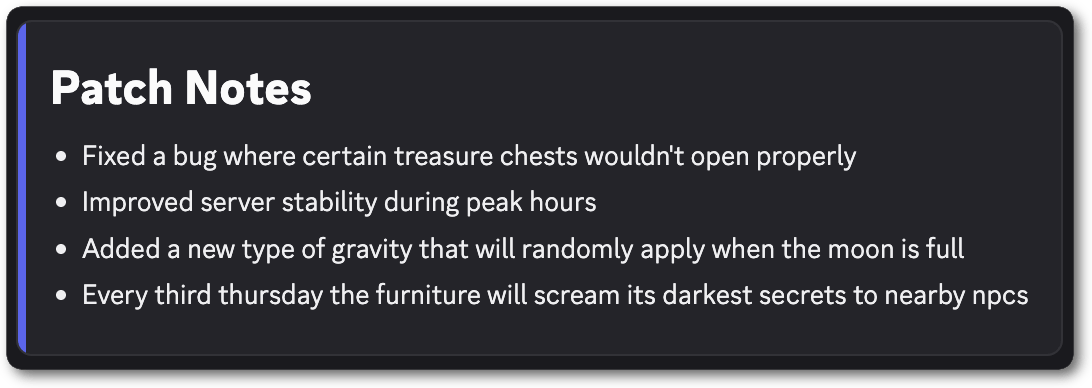
"content": "# Patch Notes\n- Fixed a bug where certain treasure chests wouldn't open properly\n- Improved server stability during peak hours\n- Added a new type of gravity that will randomly apply when the moon is full\n- Every third thursday the furniture will scream its darkest secrets to nearby npcs"
}
]
}
}
```
| Field | Type |
| - | - |
| component | [Container](/developers/components/reference#container-container-structure) |
***
## Compatible Components
A component embed can contain up to 40 components, including the parent Container component.
Some component validation failures can result in no embed being shown. Use the [Embed Debugger](https://discord.com/developers/embeds) to diagnose issues with your embed.
| Type | Component |
| - | - |
| 1 | [Action Row](/developers/components/reference#action-row-action-row-structure) |
| 2 | [Button](/developers/components/reference#button-button-structure) \* |
| 9 | [Section](/developers/components/reference#section-section-structure) |
| 10 | [Text Display](/developers/components/reference#text-display-text-display-structure) \*\* |
| 11 | [Thumbnail](/developers/components/reference#thumbnail-thumbnail-structure) |
| 12 | [Media Gallery](/developers/components/reference#media-gallery-media-gallery-structure) \*\*\* |
| 14 | [Separator](/developers/components/reference#separator-separator-structure) |
| 17 | [Container](/developers/components/reference#container-container-structure) \*\*\*\* |
\* A button must use the link style (`style` of `5`) and may contain `id`, `type`, `url`, `style`, `label`, `emoji`, and `disabled`, with a `label`, an `emoji`, or both. Any other key invalidates the entire payload.
\*\* Text Display content uses Discord markdown. See [Message Formatting](/developers/reference#message-formatting).
\*\*\* Media Gallery items are capped at 10 across the entire embed, not per component. Thumbnails don't count toward this limit.
\*\*\*\* The Container component must be the only top-level component in a component embed. A Container cannot contain another Container component.
***
## Media
Thumbnails and gallery items take an [unfurled media item](/developers/components/reference#unfurled-media-item). Discord fills in the width, height, content type, placeholder, and proxy URL after it fetches the asset. A video in a Media Gallery shows a preview frame with play controls but does not autoplay. The URL must use `http` or `https` and be a max of 2,048 characters in length. Valid file formats for video include `.mp4`, `.webm`, and `.mov`. Valid file formats for images include `.png`, `.gif`, `.jpg`, `.jpeg`, `.webp`, and `.avif`.
```json theme={"system"}
{ "url": "https://watchanimeattheoffice.com/images/hero.webp" }
```
***
## Full Example
```html theme={"system"}
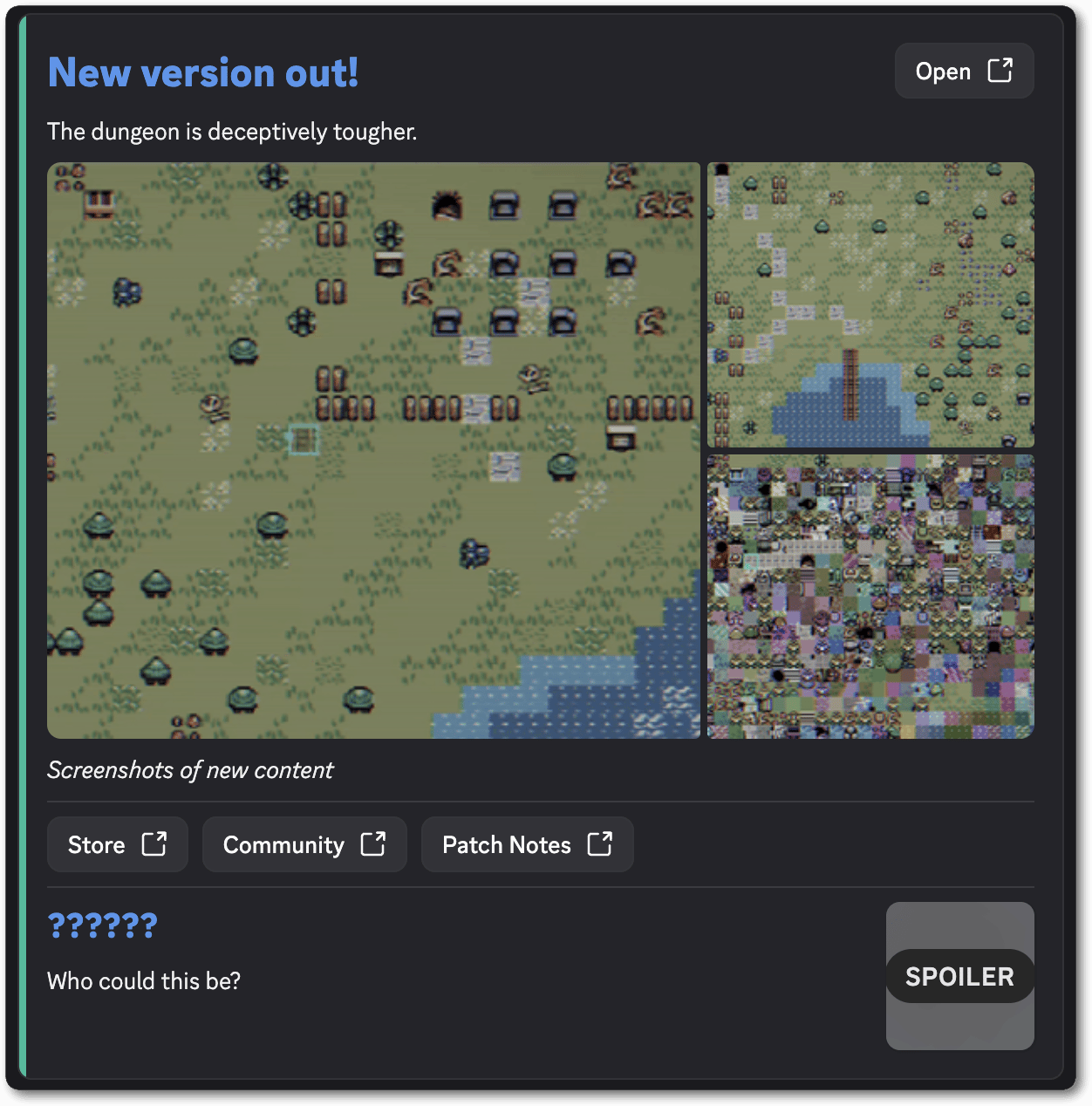
New version out!
New version out!
```
***
## Open Graph Fallback
Add these tags alongside the component-embed payload as a fallback whenever a component embed unfurl fails.
Use the [Embed Debugger](https://discord.com/developers/embeds) to diagnose issues with your embed if it fails to render.
```html theme={"system"}
```
[Link Previews](/developers/link-previews/overview) covers these tags and the rest of the metadata Discord reads.
 ***
## Payload Structure
The document, inline or linked, must be a JSON object with a single, parent [Container](/developers/components/reference#container-container-structure) component. No other component can exist at the top level with the container.
```json theme={"system"}
{
"component": {
"type": 17,
"components": [
{
"type": 10,
"content": "# Patch Notes\n- Fixed a bug where certain treasure chests wouldn't open properly\n- Improved server stability during peak hours\n- Added a new type of gravity that will randomly apply when the moon is full\n- Every third thursday the furniture will scream its darkest secrets to nearby npcs"
}
]
}
}
```
| Field | Type |
| - | - |
| component | [Container](/developers/components/reference#container-container-structure) |
***
## Compatible Components
A component embed can contain up to 40 components, including the parent Container component.
***
## Payload Structure
The document, inline or linked, must be a JSON object with a single, parent [Container](/developers/components/reference#container-container-structure) component. No other component can exist at the top level with the container.
```json theme={"system"}
{
"component": {
"type": 17,
"components": [
{
"type": 10,
"content": "# Patch Notes\n- Fixed a bug where certain treasure chests wouldn't open properly\n- Improved server stability during peak hours\n- Added a new type of gravity that will randomly apply when the moon is full\n- Every third thursday the furniture will scream its darkest secrets to nearby npcs"
}
]
}
}
```
| Field | Type |
| - | - |
| component | [Container](/developers/components/reference#container-container-structure) |
***
## Compatible Components
A component embed can contain up to 40 components, including the parent Container component.
 ***
## Open Graph Fallback
Add these tags alongside the component-embed payload as a fallback whenever a component embed unfurl fails.
***
## Open Graph Fallback
Add these tags alongside the component-embed payload as a fallback whenever a component embed unfurl fails.