> ## Documentation Index
> Fetch the complete documentation index at: https://docs.discord.com/llms.txt
> Use this file to discover all available pages before exploring further.
# Sending Direct Messages
> Send direct messages to Discord users from your application.
export const HashmarkIcon = props => ;
export const MagicDoorIcon = props => ;
export const UserIcon = props => ;
This feature is currently available with rate limits.
To increase the rate limits for your game, please follow
[Communication Features: Applying for Increased Rate Limits for Production Releases](/developers/discord-social-sdk/core-concepts/communication-features#applying-for-increased-rate-limits-for-production-releases).
## Overview
Direct Messages (DMs) allow players to communicate privately. This guide will show you how to:
* Send text messages between users
* Handle displaying messages in your game
* Retrieve conversation history and summaries
### Prerequisites
Before you begin, make sure you have:
* Set up the Discord Social SDK with our [Getting Started guide](/developers/discord-social-sdk/getting-started)
To utilize this communication feature, you must enable [`Client::GetDefaultCommunicationScopes`] in your OAuth Scope configuration.
See the [OAuth Scopes Core Concepts Guide](/developers/discord-social-sdk/core-concepts/oauth2-scopes) for more details.
[`Client::GetDefaultCommunicationScopes`]: https://discord.com/developers/docs/social-sdk/classdiscordpp_1_1Client.html#a71499da752fbdc2d4326ae0fd36c0dd1
### Types of Chat Messages
The Discord Social SDK supports two types of chat:
* [Direct messages (DMs) between two users](/developers/discord-social-sdk/development-guides/sending-direct-messages#sending-a-direct-message-to-a-user)
* [Chat messages within a lobby](/developers/discord-social-sdk/development-guides/managing-lobbies#sending-messages-to-a-lobby)
The SDK receives messages in the following channel types:
* DM
* Ephemeral DM
* Lobby
Let's get started with sending a direct message to another user.
***
## Sending a Direct Message to a User
While the SDK allows you to send messages on behalf of a user, you must only do so in response to a user action. You should never automatically send messages.
Here's how to send a direct message. You'll need the recipient's Discord ID and the message you want to send.
```cpp theme={"system"}
std::string message = "ready to queue?";
uint64_t recipientId = 1234567890; // The recipient's Discord ID
client->SendUserMessage(recipientId, message, [](auto result, uint64_t messageId) {
if (result.Successful()) {
std::cout << "✅ Message sent successfully\n";
} else {
std::cout << "❌ Failed to send message: " << result.Error() << "\n";
}
});
```
### Syncing Messages with Discord
In some situations, messages from your game with the Social SDK will also appear in Discord. This will happen for:
* 1 on 1 chat when at least one of the users is a full Discord user
* Lobby chat when the lobby is [linked to a Discord channel](/developers/discord-social-sdk/development-guides/linked-channels)
* The message must have been sent by a user who is not banned on Discord.
When messaging between provisional accounts or non-friends, channel ID and recipient ID is set to the other user's ID. These messages are sent ephemerally and do not persist within a channel. Because of that, you will not be able to resolve a [`ChannelHandle`] for them.
***
## Receiving and Rendering Messages
When a user sends a message, the SDK can respond to new messages by registering [`Client::SetMessageCreatedCallback`]. You can access the message content and sender's ID in your callback from the [`MessageHandle`] object.
The [`MessageHandle`] represents a single message received by the SDK.
```cpp theme={"system"}
client->SetMessageCreatedCallback([&client](uint64_t messageId) {
if (auto message = client->GetMessageHandle(messageId)) {
std::cout << "New message from " << message->AuthorId() << ": " << message->Content() << "\n";
}
});
```
There are also callbacks for when a message is updated or deleted. Register these callbacks with [`Client::SetMessageUpdatedCallback`] and [`Client::SetMessageDeletedCallback`].
### Suppressing Double Notifications
Suppose the user has the Discord desktop application open on the same machine as the game. In that case, they will hear notifications from the Discord application, even though they can see those messages in-game. So to avoid double-notifying users, you should call [`Client::SetShowingChat`] whenever the chat is shown or hidden to suppress those duplicate notifications.
### Legal Disclosure Message Type
As a convenience for game developers, the first time a user sends a message in the game, that message shows up on the Discord client. The SDK will inject a "fake" message into the chat that contains a basic English explanation of what is happening to the user. You can identify these messages with the [`MessageHandle::DisclosureType`] method. We encourage you to customize the rendering of these messages, possibly changing the wording, translating them, and making them look more "official". You can choose to avoid rendering these as well.
### Message History
The SDK keeps the 25 most recent messages in each channel in memory, including direct messages. For older messages,
see the [Getting Direct Message History](/developers/discord-social-sdk/development-guides/sending-direct-messages#getting-direct-message-history)
section below to retrieve additional history from Discord's servers.
A [`MessageHandle`] will keep working even after the SDK has discarded the message for being too old.
You just won't be able to create new [`MessageHandle`] objects for that message via [`Client::GetMessageHandle`].
### Working with Unrenderable Content
Messages sent on Discord can contain content that may not be renderable in-game, such as images, videos, embeds, polls, and more. The game isn't expected to render these. Instead, it should show a notice so the user knows there is more content and a way to view it on Discord. The [`MessageHandle::AdditionalContent`] method will contain data about the non-text content in this message.
You can use this metadata to render a placeholder message for players and can link out to Discord using [`Client::CanOpenMessageInDiscord`] and [`Client::OpenMessageInDiscord`].
There is also more information about [messages in the Discord API](/developers/resources/message) documentation.
## Getting Direct Message History
The SDK provides two methods to retrieve direct message conversation history, allowing you to display past conversations when users open a DM or browse their message list.
### Retrieving All Conversation Summaries
Use [`Client::GetUserMessageSummaries`] to get a list of all users the current user has DM conversations with, along
with the most recent message ID for each conversation:
```cpp theme={"system"}
client->GetUserMessageSummaries([](const discordpp::ClientResult &result,
const std::vector &summaries) {
if (result.Successful()) {
std::cout << "📋 Retrieved " << summaries.size() << " conversations\n";
for (const auto &summary : summaries) {
std::cout << "User ID: " << summary.UserId()
<< ", Last Message ID: " << summary.LastMessageId() << "\n";
}
} else {
std::cerr << "❌ Failed to retrieve conversation summaries\n";
}
});
```
This is particularly useful for:
* Building a conversation list UI
* Determining which users have active conversations
* Finding the most recent activity in each conversation
### Retrieving Messages from a Specific Conversation
Use [`Client::GetUserMessagesWithLimit`] to fetch message history from a specific DM conversation:
```cpp theme={"system"}
const uint64_t recipientId = 1234567890; // The other user's Discord ID
const int32_t messageLimit = 50; // Number of recent messages to retrieve (max 200)
client->GetUserMessagesWithLimit(
recipientId, messageLimit,
[](const discordpp::ClientResult &result,
const std::vector &messages) {
if (result.Successful()) {
std::cout << "💬 Retrieved " << messages.size()
<< " messages from conversation\n";
// Messages are returned in reverse chronological order (newest first)
for (const auto &message : messages) {
std::cout << "Message: " << message.Content()
<< " from " << message.AuthorId() << std::endl;
}
} else {
std::cerr << "❌ Failed to retrieve message history\n";
}
}
);
```
**Important limitations:**
* Only a maximum of 200 messages and up to 72 hours of history can be retrieved
* Both players must have played the game for DM history to be accessible
* If either user hasn't played the game, the system cannot find a channel between them and may return a 404 `discordpp::ErrorType::HTTPError` error
Key points about [`Client::GetUserMessagesWithLimit`] that are important to note:
* Messages are returned in reverse chronological order (newest first)
* The function checks the local cache first and only makes an HTTP request if needed
* Pass 0 or a negative value for `limit` to retrieve all available messages (up to the 200 message maximum)
This functionality is useful for:
* Displaying conversation history when a user opens a DM
* Implementing message scrollback features
* Preserving conversation context across game sessions
* Building a full-featured in-game messaging interface
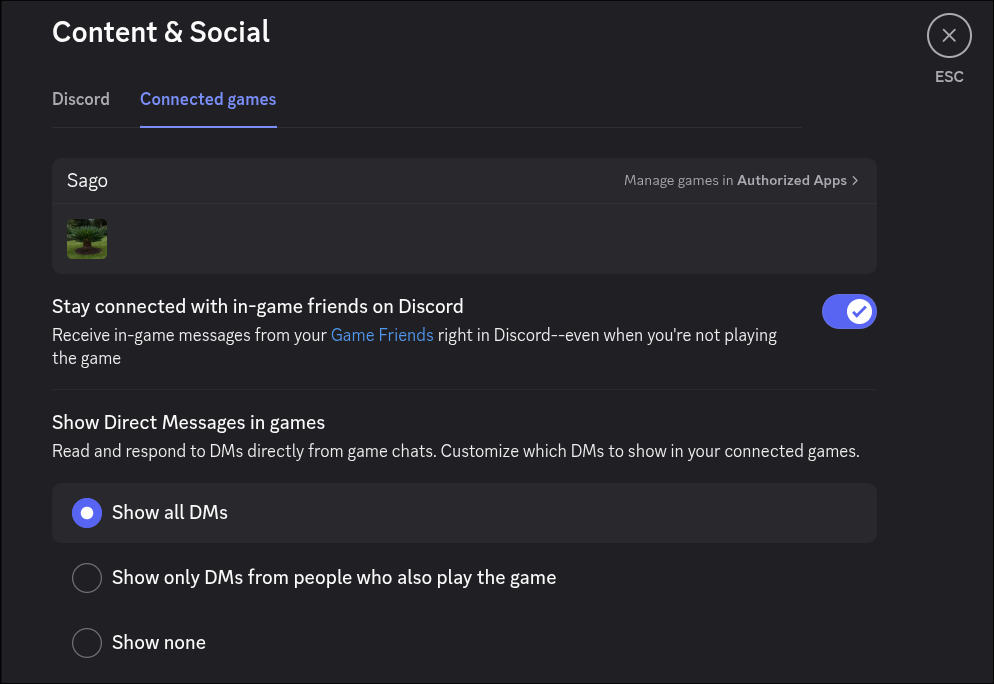
## In-Game Direct Message Settings
The Discord client provides a settings screen for users to be able to control who can DM them in-game via the
Social SDK.
You cannot control these settings directly with the Social SDK. However, you can call
[`Client::OpenConnectedGamesSettingsInDiscord`], which opens the Connected Games settings in the Discord client,
where users can manage their direct messaging settings related to games using the Discord Social SDK.
If the client isn't connected or the user is a provisional account, this function does nothing.
It is always a no-op for console platforms.
***
## Development Rate Limits
Prior to being approved for [increased rate limits](/developers/discord-social-sdk/core-concepts/communication-features#applying-for-increased-rate-limits-for-production-releases), sending direct messages is limited to **100 per 2 hours** per application.
These limitations are designed to provide sufficient capacity for development, testing, and small-scale demos while ensuring system stability.
For guidance on detecting and retrying rate limited requests in the SDK, see [Handle Rate Limits](/developers/discord-social-sdk/how-to/handle-rate-limits).
***
## Next Steps
Now that you know how to send and receive messages, check out these other Discord Social SDK features:
}>
Display in-game status and activity to friends.
}>
Bring players together in a shared lobby with invites, text chat, and voice comms.
}>
Enable text chat between a Discord channel and your game.
Need help? Join the [Discord Developers Server](https://discord.gg/discord-developers) and share questions in the `#social-sdk-dev-help` channel for support from the community.
If you encounter a bug while working with the Social SDK, please report it here: [https://dis.gd/social-sdk-bug-report](https://dis.gd/social-sdk-bug-report)
***
## Change Log
| Date | Changes |
| --------------- | -------------------------------- |
| August 29, 2025 | Add DM history |
| June 30, 2025 | Add communications scope warning |
| May 06, 2025 | link to DM Settings |
| March 17, 2025 | initial release |
[`ChannelHandle`]: https://discord.com/developers/docs/social-sdk/classdiscordpp_1_1ChannelHandle.html#ac32096b2ef15c5c220e9b7b92253cc46
[`Client::CanOpenMessageInDiscord`]: https://discord.com/developers/docs/social-sdk/classdiscordpp_1_1Client.html#ae2aac143a691091691c5cc75aa07dace
[`Client::GetMessageHandle`]: https://discord.com/developers/docs/social-sdk/classdiscordpp_1_1Client.html#a7825220b28952a2156bd0e46db40ea5c
[`Client::GetUserMessageSummaries`]: https://discord.com/developers/docs/social-sdk/classdiscordpp_1_1Client.html#a32dafc20ff1f99b019e40bdc81f46dde
[`Client::GetUserMessagesWithLimit`]: https://discord.com/developers/docs/social-sdk/classdiscordpp_1_1Client.html#a054a758a76c5873b38a4d79651a5f26c
[`Client::OpenConnectedGamesSettingsInDiscord`]: https://discord.com/developers/docs/social-sdk/classdiscordpp_1_1Client.html#a24f268f5eebe9919a3f774354eb577e0
[`Client::OpenMessageInDiscord`]: https://discord.com/developers/docs/social-sdk/classdiscordpp_1_1Client.html#a66b8f85b14403a5d5ea125f39aa6e1b1
[`Client::SetMessageCreatedCallback`]: https://discord.com/developers/docs/social-sdk/classdiscordpp_1_1Client.html#a28325a8e8c688a84ac851da4bc86e148
[`Client::SetMessageDeletedCallback`]: https://discord.com/developers/docs/social-sdk/classdiscordpp_1_1Client.html#a2b6079eded10bea29abbb9695702637b
[`Client::SetMessageUpdatedCallback`]: https://discord.com/developers/docs/social-sdk/classdiscordpp_1_1Client.html#aa01cf3c15403f29780dabfcfaf3b1dcd
[`Client::SetShowingChat`]: https://discord.com/developers/docs/social-sdk/classdiscordpp_1_1Client.html#acdf400ecb926392d1a110da73152b594
[`MessageHandle`]: https://discord.com/developers/docs/social-sdk/classdiscordpp_1_1MessageHandle.html#ae25595b43bc74b0c4c92c5165d16382f
[`MessageHandle::AdditionalContent`]: https://discord.com/developers/docs/social-sdk/classdiscordpp_1_1MessageHandle.html#af4497491a95fda65402b6acf7a8b42e5
[`MessageHandle::DisclosureType`]: https://discord.com/developers/docs/social-sdk/classdiscordpp_1_1MessageHandle.html#abefb9be7836951a6acf78a4bb1676638
 You cannot control these settings directly with the Social SDK. However, you can call
[`Client::OpenConnectedGamesSettingsInDiscord`], which opens the Connected Games settings in the Discord client,
where users can manage their direct messaging settings related to games using the Discord Social SDK.
If the client isn't connected or the user is a provisional account, this function does nothing.
It is always a no-op for console platforms.
***
## Development Rate Limits
Prior to being approved for [increased rate limits](/developers/discord-social-sdk/core-concepts/communication-features#applying-for-increased-rate-limits-for-production-releases), sending direct messages is limited to **100 per 2 hours** per application.
These limitations are designed to provide sufficient capacity for development, testing, and small-scale demos while ensuring system stability.
For guidance on detecting and retrying rate limited requests in the SDK, see [Handle Rate Limits](/developers/discord-social-sdk/how-to/handle-rate-limits).
***
## Next Steps
Now that you know how to send and receive messages, check out these other Discord Social SDK features:
You cannot control these settings directly with the Social SDK. However, you can call
[`Client::OpenConnectedGamesSettingsInDiscord`], which opens the Connected Games settings in the Discord client,
where users can manage their direct messaging settings related to games using the Discord Social SDK.
If the client isn't connected or the user is a provisional account, this function does nothing.
It is always a no-op for console platforms.
***
## Development Rate Limits
Prior to being approved for [increased rate limits](/developers/discord-social-sdk/core-concepts/communication-features#applying-for-increased-rate-limits-for-production-releases), sending direct messages is limited to **100 per 2 hours** per application.
These limitations are designed to provide sufficient capacity for development, testing, and small-scale demos while ensuring system stability.
For guidance on detecting and retrying rate limited requests in the SDK, see [Handle Rate Limits](/developers/discord-social-sdk/how-to/handle-rate-limits).
***
## Next Steps
Now that you know how to send and receive messages, check out these other Discord Social SDK features: